
Have you ever been debugging in UE5, thrown in a breakpoint which hits, and you want to see information about the object:

The object name under the value for the “this” field shows this is the object BP_PawnTurret_C_1. This is a name automatically assigned by UE into the UObjectBase::NamePrivate member variable, essentially the class name plus some number.
Sometimes if you have multiple objects in the scene, you’d perhaps quite like to know WHICH instance of the class you’re debugging. The AActor::ActorLabel field is often more helpful because you can assign custom names to objects in the world outliner.
You can find this by navigating through the this pointer hierarchy to find the AActor root class and the ActorLabel field, but that’s a bit tedious. It’s possible to display this info in the debug window using natvis, which is how UE is able to tell visual studio how to display information for classes etc. Open the file Engine\Extras\VisualStudioDebugging\Unreal.natvis, and browse to where this code is:
<!-- UObjectBase visualizer -->
  <Type Name="UObjectBase">
    <DisplayString>(Name={NamePrivate})</DisplayString>
  </Type>
This is how VS was displaying the object name. We can add our own block for AActor to make it display the actor label:
 <!-- AActor visualizer -->
  <Type Name="AActor">
    <DisplayString>(Name={NamePrivate}, Label={ActorLabel})</DisplayString>
  </Type>
And now the debug info shows this:

which is much more convenient!
Likewise, components display this when being debugged:
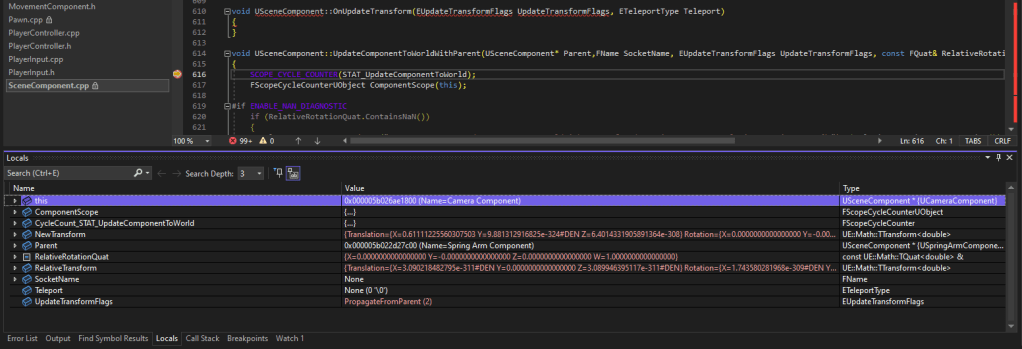
OK, it’s a camera component, but it would be helpful to know which actor it’s on. Again, one could browse down to the AActorComponent::OwnerPrivate field and then down to the ActorLabel field again. Or we can use natvis again:
<!-- UActorComponent visualizer -->
  <Type Name="UActorComponent">
    <DisplayString>(Name={NamePrivate}, OwnerLabel={OwnerPrivate->ActorLabel})</DisplayString>
  </Type>
Giving this:

Much nicer!
Natvis is quite powerful and lets you define all kinds of custom type information. Browse the rest of this file for examples and check out https://code.visualstudio.com/docs/cpp/natvis for more info.
 Mint Banjo
Leave a comment