
About
“Counter Strike: Global Offensive” (CSGO) is a popular online FPS game by valve. There is a large competitive scene and multi-million prize tournaments.
The game is 5v5 and round-based. Terrorists aim to plant a bomb, and counter-terrorists aim to prevent that or defuse said bomb after it’s planted. Players have the option to use various utlity grenades.
Teams often plan complex strategies with precise timings in order to increase their chances of winning a round. They may hire managers or coaches whose job is to invent strategies and analyse the strategies of other teams. The strategizer program is a desktop app aiming to assist with this planning, as well as memorising the strategies and sharing them. You can build a strategy and then visualize it – this is useful for each player to learn the strategy timings and execute it perfectly.
Example
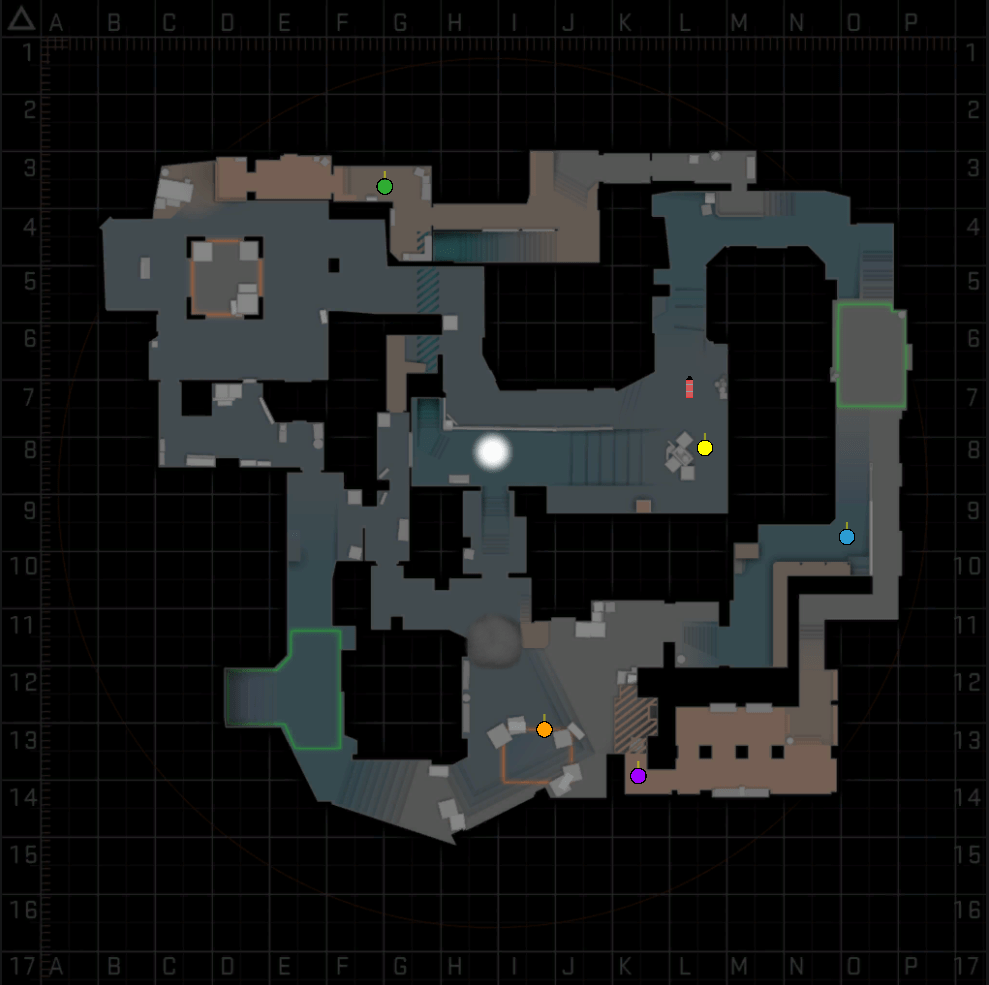
A demo strategy is showcased below, on the map “mirage”, with terrorists aiming to plant the bomb on the A bombsite by co-ordinating their utility and movements.
Program
The program is written in C++ with the imgui library, and directx12 for the program backend and image rendering.
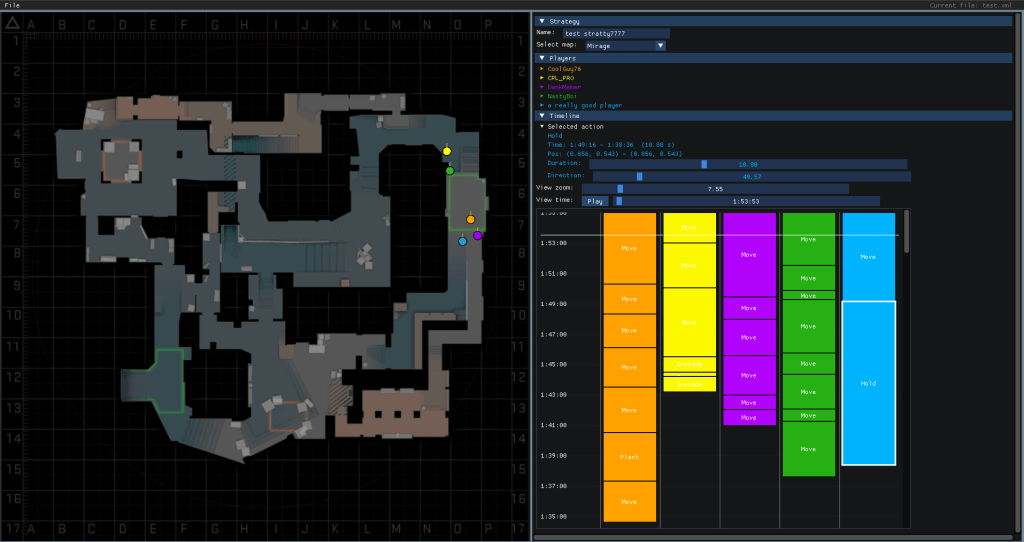
The left panel contains an overview of the game map, and objects (players, grenades, etc) are represented in a given position. The right panel allows customisation of the strategy and players. Each player has a queue of possible actions (e.g. move, wait, grenade, plant bomb), which are stored and performed sequentially. There’s a timeline for viewing and editing the action queue, which can be zoomed and scrubbed. Each action has editable parameters once selected.

Once the actions are setup for each player, the viewport renders the current state (handled absolutely as time can be scrubbed backwards / forwards).
There is functioning file handling using tinyxml2 so strategies can be saved, loaded and shared.

Development
UI
As mentioned, imgui was used for the UI, which proved to be a very easy to use and well written. It’s a very helpful library for other game tools (e.g. debugging visualisation, file handling etc) as it integrates easily with most game engines.
The immediate-mode style means you can handle all the layout via code (ideal for programmers who may prefer this to learning yet another visual layout editor), and allows you to be modular with the design, separating each window into different classes. For example the main window draw function for this program handles drawing the menu bar (file handling) and then forwards the other window drawing to a separate tactic window class (left panel) and info window (right panel) class:
void CMainWindow::Draw()
{
	static ImVec2* s_pPickedPosAssign_ms = nullptr;

	DrawMenuBar(s_pPickedPosAssign_ms);

	//decide sizes of the sub-windows
	const ImVec2 progSize = ImGui::GetMainViewport()->Size;
	if (progSize != m_progSize)
	{
		//have been resized
		m_progSize = progSize;
		UpdateWindowSizes();
	}

	const ImGuiWindowFlags windowFlags =
		ImGuiWindowFlags_NoTitleBar |
		ImGuiWindowFlags_NoMove |
		ImGuiWindowFlags_NoResize;

	ImGui::SetNextWindowSize(m_tacticWindowSize);
	ImGui::SetNextWindowPos(m_tacticWindowPos);
	if (ImGui::Begin("TacticWindow", nullptr, windowFlags))
	{
		m_tacticWindow.Draw(m_pStrategy, s_pPickedPosAssign_ms, m_infoWindow.GetTimeline());
		ImGui::End();
	}

	ImGui::SetNextWindowSize(m_infoWindowSize);
	ImGui::SetNextWindowPos(m_infoWindowPos);
	if (ImGui::Begin("InfoWindow", nullptr, windowFlags | ImGuiWindowFlags_AlwaysHorizontalScrollbar | ImGuiWindowFlags_AlwaysVerticalScrollbar))
	{
		m_infoWindow.Draw(m_pStrategy, s_pPickedPosAssign_ms);
		ImGui::End();
	}
}
and the info window is split into separate classes for displaying the player info, strategy info, timeline, etc, where each class is holds & draws its own state. For example information about the strategy is drawn by sequential calls to the ImGui namespaced widgets, also handling user input:
ImGui::SetNextItemOpen(true, ImGuiCond_Once);
if (ImGui::CollapsingHeader("Strategy##info"))
{
	ImGui::Text("Name: ");
	ImGui::SameLine();
	std::string* pName = &(pStrategy->GetName());
	ImGui::SetNextItemWidth(200.0f);
	if (ImGui::InputText("##editstrategyname", pName))
	{
		pStrategy->SetModified();
	}

	EMap* pMap = &(pStrategy->GetMap());
	ImGui::Text("Select map: ");
	ImGui::SameLine();
	ImGui::SetNextItemWidth(150.0f);
	if (ImGui::BeginCombo("##selectmap", MapToString(*pMap).c_str()))
	{
		for (int i = 0; i < (int)EMap::LAST; ++i)
		{
			bool selected = i == (int)*pMap;
			if (ImGui::Selectable(MapToString((EMap)i).c_str(), &selected))
			{
				*pMap = (EMap)i;
				pStrategy->SetModified();
			}
		}

		ImGui::EndCombo();
	}
}
Challenges
Perhaps the trickiest “gotcha” for imgui is getting to grips with how it handles labels and the ID stack for the widgets (see https://github.com/ocornut/imgui/blob/master/docs/FAQ.md#qa-usage), especially in loops or involving common labels. This sometimes leads to unexpected results and widgets misbehaving if handled incorrectly. It’s best to liberally use the ##sometext pattern in widget labels to always ensure uniqueness. Also, there seemed to be a little inconsistency in the API about whether widgets expect you to match Begin() and End() calls (some seem to require it whilst others don’t).
Otherwise the most difficult part for the program was handling the spatial co-ordinates for each sub-window (for example in the timeline window which supports zooming / panning) for the positioning of sub-elements. I found it helpful to clearly label each ImVec2 variable with which nested co-ordinate space it relates to (screen space, program space, window space, etc) and have helper functions to convert between each.
Serialization
Likewise, tinyXML proved very easy to use and an excellent choice for serialization. It handles serializing all built in data type and custom types can be easily serialized:
void CStrategy::WriteToXML(tinyxml2::XMLElement* pElement)
{
	pElement->SetAttribute(SERIALIZATION_STRATEGY_MAP, (int)m_map);
	pElement->SetAttribute(SERIALIZATION_STRATEGY_NAME, m_name.c_str());

	for (CPlayer& player : m_players)
	{
		tinyxml2::XMLElement* pPlayerElement = pElement->InsertNewChildElement(SERIALIZATION_PLAYER);
		player.WriteToXML(pPlayerElement);
	}

	m_modified = false;
}

void CStrategy::ReadFromXML(tinyxml2::XMLElement* pElement)
{
	m_players.clear();

	m_map = (EMap)pElement->IntAttribute(SERIALIZATION_STRATEGY_MAP);
	m_name = pElement->Attribute(SERIALIZATION_STRATEGY_NAME);

	tinyxml2::XMLElement* pPlayerElement = pElement->FirstChildElement(SERIALIZATION_PLAYER);
	while (pPlayerElement)
	{
		m_players.push_back(CPlayer{});
		m_players.back().ReadFromXML(pPlayerElement);

		pPlayerElement = pPlayerElement->NextSiblingElement(SERIALIZATION_PLAYER);
	}

	m_modified = false;
}
where here CStrategy owns CPlayers which owns their CActions for the strategy, and the code progresses into each subclass to write its own data to file.
 Mint Banjo