
Spline point metadata
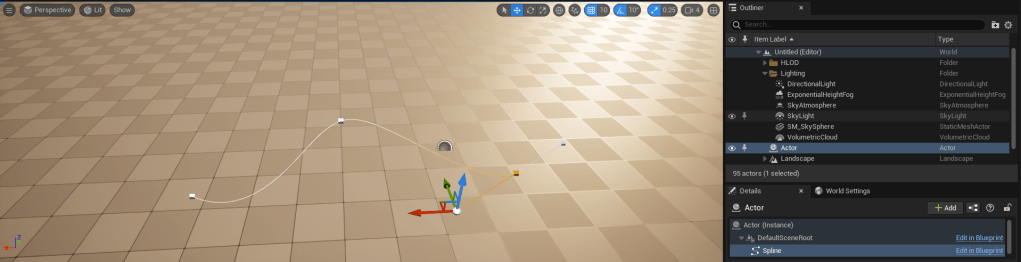
Unreal engine 5 has a spline component allowing creation of custom curves, by adding points and manipulating the tangents. Documentation can be found here: https://docs.unrealengine.com/4.27/en-US/API/Runtime/Engine/Components/USplineComponent/ . For example:
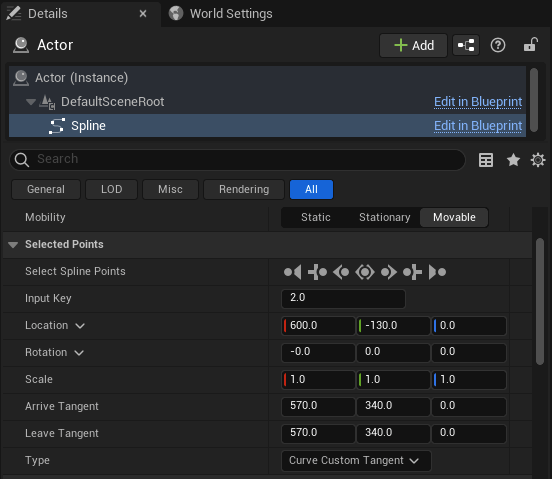
It’s sometimes helpful for many gameplay applications to be able to add custom metadata onto each point, so it can be edited alongside the spline point details panel, and saved into the level:
The engine makes this possible, but it isn’t trivial, and could be challenging for beginners or non-coders. Hence, this small guide was put together to go through how to achieve this. Follow along below or if you prefer, the code can be grabbed on github: https://github.com/MintBanjo/UE5_SplinePointsMetadata .
Project and module setup
We’re going to start a new blank C++ games project in UE5. I’ve called mine “SPM”.

We’ll need to add an editor module, as we’ll need to write some code to visualise and edit the spline points, and we’ll have some dependencies on other editor code which we won’t want to pull into the main module.
This community wiki guide is helpful: https://unrealcommunity.wiki/creating-an-editor-module-x64nt5g3 , or follow along below.
We need to edit our .uproject file to add a new editor module:
{
	"FileVersion": 3,
	"EngineAssociation": "5.0",
	"Category": "",
	"Description": "",
	"Modules": [
		{
			"Name": "SPM",
			"Type": "Runtime",
			"LoadingPhase": "Default"
		},
		{
			"Name": "SPMEditor",
			"Type": "Editor",
			"LoadingPhase": "PostEngineInit"
		}
	],
	"Plugins": [
		{
			"Name": "ModelingToolsEditorMode",
			"Enabled": true,
			"TargetAllowList": [
				"Editor"
			]
		}
	]
}
In Source/SPMEditor.Target.cs we need to add the editor module to the module names array:
using UnrealBuildTool;
using System.Collections.Generic;

public class SPMEditorTarget : TargetRules
{
	public SPMEditorTarget( TargetInfo Target) : base(Target)
	{
		Type = TargetType.Editor;
		DefaultBuildSettings = BuildSettingsVersion.V2;
		ExtraModuleNames.AddRange( new string[] { "SPM", "SPMEditor" } );
	}
}
Let’s add a new file Source/SPMEditor/SPMEditor.cpp containing the following which will register our module at runtime:
#include "Modules/ModuleManager.h"

IMPLEMENT_MODULE(FDefaultModuleImpl, SPMEditor);
And another file called Source/SPMEditor/SPMEditor.Build.cs containing the following:
using UnrealBuildTool;

public class SPMEditor : ModuleRules
{
    public SPMEditor(ReadOnlyTargetRules Target) : base(Target)
    {
        PCHUsage = PCHUsageMode.UseExplicitOrSharedPCHs;

        PublicDependencyModuleNames.AddRange(new string[]
        {
            "Core",
            "CoreUObject",
            "Engine",
            "InputCore",
            "SPM",
            "DetailCustomizations",
            "Slate",
            "SlateCore",
            "UnrealEd",
            "PropertyEditor",
            "EditorStyle"
        });
    }
}
Where SPM is our game module and the modules below will be required for the slate code to display the point metadata in editor.
Right click on the uproject and generate new visual studio project files to reflect these changes, and build the project.
Creating the component
Adding classes
We need to create a few new C++ classes through the editor UI:
- Create a new class in the SPM module deriving from
AActor, calledUMySplineActor, inMySplineActor.h. - Create a new class in the SPM module deriving from
USplineComponent, calledUMySplineComponent, inMySplineComponent.h. - Create a new class in the SPM module deriving from
USplineMetadata, calledUMySplineMetadata, inMySplineMetadata.h. - Create a new class in the SPMEditor module deriving from
USplineMetadataDetailsFactoryBase, calledUMySplineMetadataDetailsFactory, inMySplineMetadataDetails.h.
It’s best to close the editor at this point, regenerate the VS project and build again.
Spline metadata
In MySplineActor.h let’s create the actor which will have a spline component and store the spline metadata:
UCLASS()
class SPM_API AMySplineActor : public AActor
{
	GENERATED_BODY()

public:
	AMySplineActor();
	UMySplineMetadata* GetSplineMetadata() const;

private:
	UPROPERTY(Instanced, Export)
	UMySplineMetadata* MySplineMetadata = nullptr;

	UPROPERTY(VisibleAnywhere)
	UMySplineComponent* MySplineComponent = nullptr;
};
Where the actor will create both of these objects in its constructor:
AMySplineActor::AMySplineActor()
{
	PrimaryActorTick.bCanEverTick = false;

	MySplineMetadata = CreateDefaultSubobject<UMySplineMetadata>(TEXT("MySplineMetadata"));
	MySplineMetadata->Reset(2);
	MySplineMetadata->AddPoint(0.0f);
	MySplineMetadata->AddPoint(1.0f);

	MySplineComponent = CreateDefaultSubobject<UMySplineComponent>(TEXT("MySplineComponent"));
	SetRootComponent(MySplineComponent);
}

UMySplineMetadata* AMySplineActor::GetSplineMetadata() const
{
	return MySplineMetadata;
}
In MySplineComponent.h let’s create our struct which will hold our custom data:
USTRUCT()
struct FMySplinePointParams
{
	GENERATED_BODY()

public:
	UPROPERTY(EditAnywhere)
	float TestFloat = 1.0f;
};
We’re going to test using a single float value, but you can add any type here. It’s easiest to keep the custom data inside a single struct which can be passed around / edited. We now need to edit our spline component:
UCLASS(meta = (BlueprintSpawnableComponent))
class SPM_API UMySplineComponent : public USplineComponent
{
	GENERATED_BODY()

public:
	virtual USplineMetadata* GetSplinePointsMetadata();
	virtual const USplineMetadata* GetSplinePointsMetadata() const;
	virtual void PostLoad() override;
	virtual void PostDuplicate(bool bDuplicateForPie) override;
#if WITH_EDITOR
	virtual void PostEditChangeProperty(FPropertyChangedEvent& PropertyChangedEvent) override;
	virtual void PostEditImport() override;
#endif
	void FixupPoints();
};
The important thing here is to override GetSplinePointsMetadata to return our UMySplineMetadata type. The metadata will be owned by the spline actor, so we will forward the call to grab it from there. The rest is some safety code to call FixupPoints on the spline metadata temporarily.
We need a spline metadata class which will override USplineMetadata and contain our custom point params:
UCLASS()
class SPM_API UMySplineMetadata : public USplineMetadata
{
	GENERATED_BODY()

public:
	virtual void InsertPoint(int32 Index, float t, bool bClosedLoop) override;
	virtual void UpdatePoint(int32 Index, float t, bool bClosedLoop) override;
	virtual void AddPoint(float InputKey) override;
	virtual void RemovePoint(int32 Index) override;
	virtual void DuplicatePoint(int32 Index) override;
	virtual void CopyPoint(const USplineMetadata* FromSplineMetadata, int32 FromIndex, int32 ToIndex) override;
	virtual void Reset(int32 NumPoints) override;
	virtual void Fixup(int32 NumPoints, USplineComponent* SplineComp) override;

	UPROPERTY(EditAnywhere)
	TArray<FMySplinePointParams> PointParams;
};
Where PointParams is the array of FMySplinePointParams containing the actual data. In the cpp file for this class, we need to implement the above functions, which are called by the editor to keep our metadata in sync with the number of spline points, by adding / removing new points etc.
Factory and metadata details
We need to create a metadata details class, and a factory class to create it, in order to display our custom point data in the spline component details panel. Edit UMySplineMetadataDetailsFactory :
UCLASS()
class SPMEDITOR_API UMySplineMetadataDetailsFactory : public USplineMetadataDetailsFactoryBase
{
	GENERATED_BODY()

	virtual ~UMySplineMetadataDetailsFactory() {}
	virtual TSharedPtr<ISplineMetadataDetails> Create() override;
	virtual UClass* GetMetadataClass() const override;
};
Where Create will create our custom metadata details FMySplineMetadataDetails (see below), and GetMetadataClass refers to UMySplineMetadata. This is required because at the bottom of FSplinePointDetails::GenerateChildContent, the code searches for any children of this class and checks if the metadata matches, allowing the engine to create a FMySplineMetadataDetails which will display our custom point info in editor.
Add the following class below this in the same file, which will inherit from ISplineMetadataDetails:
class SPMEDITOR_API FMySplineMetadataDetails : public ISplineMetadataDetails, public TSharedFromThis<FMySplineMetadataDetails>
{
public:

	virtual ~FMySplineMetadataDetails() {}
	virtual FName GetName() const override;
	virtual FText GetDisplayName() const override;
	virtual void Update(USplineComponent* InSplineComponent, const TSet<int32>& InSelectedKeys) override;
	virtual void GenerateChildContent(IDetailGroup& DetailGroup) override;

private:
	UMySplineMetadata* GetMetadata() const;
	TOptional<float> GetTestFloat() const;
	void OnSetTestFloat(float NewValue, ETextCommit::Type CommitInfo);
	void OnSetValues(FMySplineMetadataDetails& Details);

	TOptional<float> TestFloatValue;
	USplineComponent* SplineComp = nullptr;
	TSet<int32> SelectedKeys;
};
This class is responsible for the slate code which will display the UI for the custom data and handle passing edits onto the spline metadata object. For each param added, we’ll need to add a widget row to display it:
void FMySplineMetadataDetails::GenerateChildContent(IDetailGroup& DetailGroup)
{
	DetailGroup.AddWidgetRow()
		.Visibility(EVisibility::Visible)
		.NameContent()
		.HAlign(HAlign_Left)
		.VAlign(VAlign_Center)
		[
			SNew(STextBlock)
			.Text(LOCTEXT("TestFloat", "TestFloat"))
		.Font(IDetailLayoutBuilder::GetDetailFont())
		]
	.ValueContent()
		.MinDesiredWidth(125.0f)
		.MaxDesiredWidth(125.0f)
		[
			SNew(SNumericEntryBox<float>)
			.Value(this, &FMySplineMetadataDetails::GetTestFloat)
		.AllowSpin(false)
		.MinValue(0.0f)
		.MaxValue(TOptional<float>())
		.MinSliderValue(0.0f)
		.MaxSliderValue(TOptional<float>()) // No upper limit
		.UndeterminedString(LOCTEXT("Multiple", "Multiple"))
		.OnValueCommitted(this, &FMySplineMetadataDetails::OnSetTestFloat)
		.Font(IDetailLayoutBuilder::GetDetailFont())
		];
}
Where after setting the value, we pass it on to the metadata:
void FMySplineMetadataDetails::OnSetValues(FMySplineMetadataDetails& Details)
{
	Details.SplineComp->GetSplinePointsMetadata()->Modify();
	Details.SplineComp->UpdateSpline();
	Details.SplineComp->bSplineHasBeenEdited = true;
	static FProperty* SplineCurvesProperty = FindFProperty<FProperty>(USplineComponent::StaticClass(), GET_MEMBER_NAME_CHECKED(USplineComponent, SplineCurves));
	FComponentVisualizer::NotifyPropertyModified(Details.SplineComp, SplineCurvesProperty);
	Details.Update(Details.SplineComp, Details.SelectedKeys);

	GEditor->RedrawLevelEditingViewports(true);
}

void FMySplineMetadataDetails::OnSetTestFloat(float NewValue, ETextCommit::Type CommitInfo)
{
	if (UMySplineMetadata* Metadata = GetMetadata())
	{
		const FScopedTransaction Transaction(LOCTEXT("SetTestFloat", "Set spline point test float"));

		for (int32 Index : SelectedKeys)
		{
			Metadata->PointParams[Index].TestFloat = NewValue;
		}

		OnSetValues(*this);
	}
}
See the github depot for the full code.
Result
Hopefully, the result will be that you can create an actor of type AMySplineActor, and create new spline points which contain our metadata:
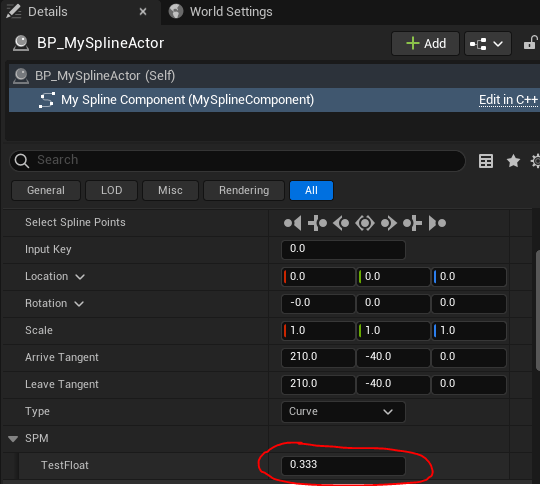
which is saved into the level data and can be accessed at runtime:
float AMySplineActor::GetTestFloatAtSplinePoint(int32 PointIndex)
{
	if (ensure(MySplineMetadata))
	{
		if (ensure(MySplineMetadata->PointParams.IsValidIndex(PointIndex)))
		{
			return MySplineMetadata->PointParams[PointIndex].TestFloat;
		}
	}

	return 0.0f;
}
Note that some functions like GetFloatPropertyAtSplinePoint won’t work with our example because we have wrapped our params in a struct inside UMySplineMetadata (FMySplinePointParams). Also we are using a regular array rather than an FInterpCurve so values won’t be interpolated, however this does mean we could support having other variable types like bool inside our struct. If you’d like to support interp curves, check out the UWaterSplineMetadata example in Epic’s code.
Component only
If you prefer to have a more flexible component-only approach where you’re not tied to having an owner actor of a specific type and can put this component on any actor: we can instead change the code to make UMySplineComponent own the USplineMetadata. Unfortunately this gets a bit more complicated because if this component gets put on a blueprint actor, the editor will constantly destroy and recreate this component when moving / editing the actor in editor. Our metadata object might not be automatically saved during this process and you may find the values get reset.
The workaround here is to use the component instance data system to store and restore our data. You can do this by overriding a FSplineInstanceData object in FMySplineInstanceData and store the array of PointParams there, something like this:
TStructOnScope<FActorComponentInstanceData> UMySplineComponent::GetComponentInstanceData() const
{
	TStructOnScope<FActorComponentInstanceData> InstanceData = MakeStructOnScope<FActorComponentInstanceData, FMySplineInstanceData>(this);
	FMySplineInstanceData* SplineInstanceData = InstanceData.Cast<FMySplineInstanceData>();

	if (MySplineMetadata)
	{
		SplineInstanceData->PointParams = MySplineMetadata->PointParams;
	}

	if (bSplineHasBeenEdited)
	{
		SplineInstanceData->SplineCurves = SplineCurves;
	}
	SplineInstanceData->bSplineHasBeenEdited = bSplineHasBeenEdited;

	return InstanceData;
}

void UMySplineComponent::ApplyMyComponentInstanceData(FMySplineInstanceData* ComponentInstanceData, const bool bPostUCS)
{
	if (MySplineMetadata)
	{
		MySplineMetadata->PointParams = ComponentInstanceData->PointParams;
	}
}
where GetComponentInstanceData is overridden in the class, and ApplyMyComponentInstanceData can be called from FMySplineInstanceData::ApplyToComponent.
6 responses to “Unreal Engine 5: Spline point metadata”
-
Wow, thank you. I saw the get property at node and was trying to figure out how to use it – would have never figured it out without your guide!
LikeLike
-
No problem, glad it helped!
LikeLike
-
-
This is awesome, thank you! Any chance you could post a solution on how to accomplish this with a metadata field being gameplaytag or gameplaytag container? i seem to be having an issue of creating a slate widget to support this.
LikeLike
-
NP!
I haven’t tried that myself before but it should be possible to make use of epic’s widgets for selecting a tag?
E.g. in FMySplineMetadataDetails::GenerateChildContent where we are using SNew(SNumericEntryBox), you would instead use SNew(SGameplayTagPicker) – take a look at epic’s examples. There’s a .OnTagChanged_Raw member you could bind to and then push that tag onto the metadata similar to what we’re doing in OnSetTestFloat
For a tag container, SGameplayTagContainerCombo might be the correct widget
Good luck!
LikeLike
-
You were right about the SGameplayTagContainerCombo being the right widget. I noticed that it wasn’t accessible in earlier versions of the engine but was made available in 5.3 for others that may not see it. Thanks!
LikeLike
-
-
-
Another quick question. Do you know if there is an easy way to create a TArray or a TMap assigned to each spline point without having to reinvent the wheel and add widgets one by one? Thanks again!
LikeLike


 Mint Banjo
Leave a reply to Mihai Wilson Cancel reply